Tuesday, 20 April 2021

The Easiest Way to Get Multiple People to Sign Documents


Have you ever felt a need to get a group of people for signing digital documents? Regardless of whether these people live far away from you or they live close by, this might present some kind of difficulty. In the past, the process of getting people to sign documents, getting them printed, and sending them by post involved spending a lot of money, and waiting for days or sometimes even weeks so that the documents could finally return.

In addition, things such as a printer and a scanner were needed which were too time-consuming. Fortunately, this situation has changed considerably today with the use of free electronic signatures solutions. You can use the e-signature online tools for uploading your contract and adding in the required fields.

This will enable the e-signature online software to create the fields and ensure the guiding process while a document is being signed. When the signers receive the contracts in their inbox, the software solution takes care of them and helps them in signing just as it would have been if you had met these people.
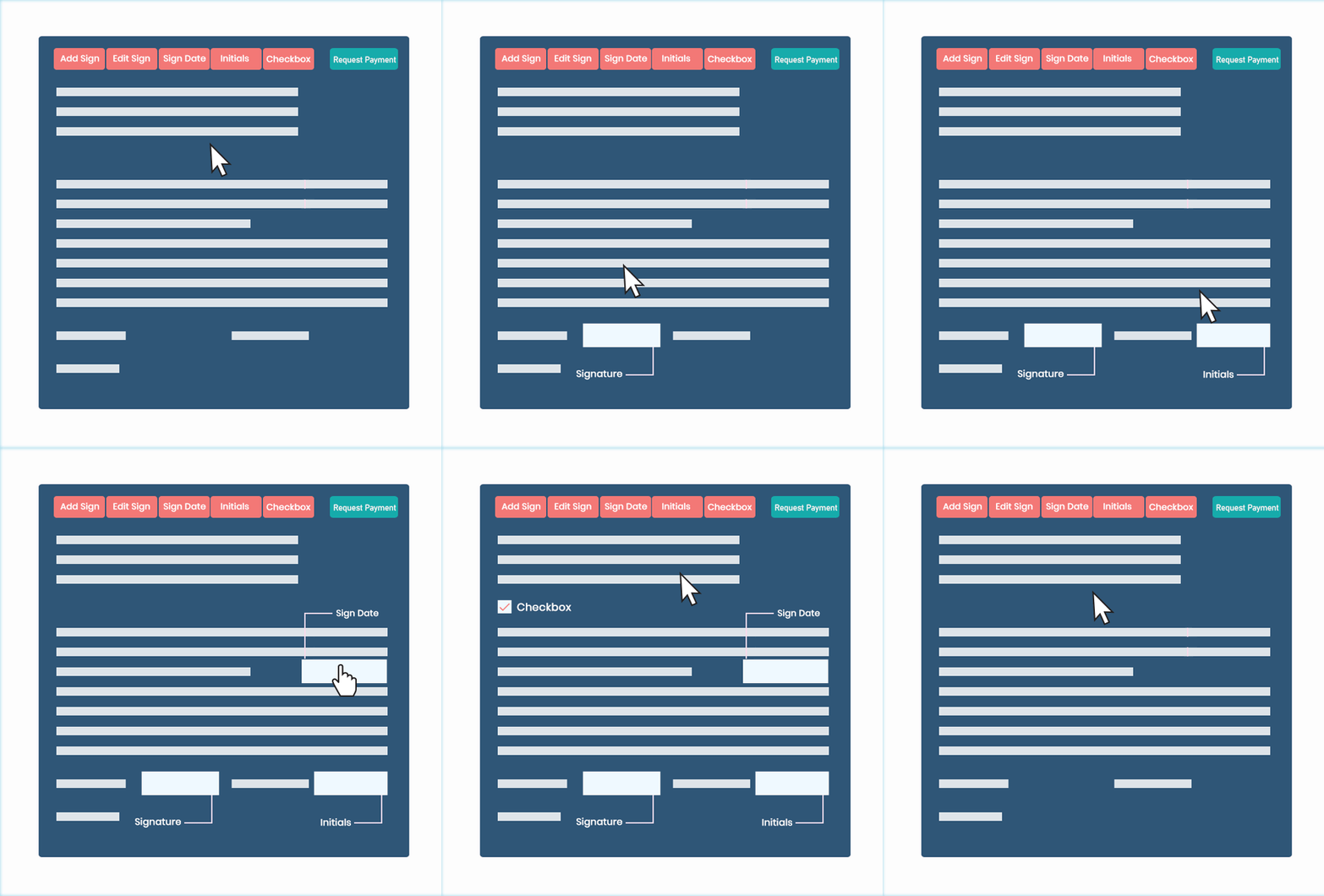


Below, we will explain a general way in which you can get your documents signed. The e-signatures enable a person to offer legal consent or online approval. Hence, you can sign almost anything without any need to get the physical documents printed.

· Selecting All Signers: Right after you have your official contract ready, you can use the electronic signature tool to send the contract to the signers. In case your contract needs to be signed by different people in proper order including you then you can also send one after another because every stakeholder will be required to sign the agreement.

· Compiling the Document: After all the fields in a contract have been defined, they should be included in the document. These fields can include important things such as dates, checkboxes, signatures, etc. You can assign each of these fields to the signers while adding a title and an optional message for them. You can also choose a template or directly upload a contract. In addition, you can also add their names and emails.

· Signing the Contract: The signers will receive the signature request through email. After this is done, all that the signers have to do is fill all the fields that have been signed to them without leaving the platform. Once the official documents are signed, the platform can also keep a backup for all the documents just in case there is a need.

Conclusion:

E signature software solutions make it very easy to send a document to a group of people for signing. You can effectively send either one person to a couple of them while getting these documents within seconds. This makes closing overseas business deals very simple and much more effective. Go ahead and start sending e-sign documents so that you can collect signatures right away. 


Monday, 22 March 2021

How to Create an Electronic Signature in PDF online?


Electronic signatures are a comfortable, a legally compliant, and modern equivalent of the traditional signatures that were done on paper. There are e-signature free online solutions that help in creating an electronic signature for free.

Adding an e-signature on a PDF is one of the most common objectives that should be done to a file. This is all the more true when you are a lawyer, professional, or government official who has experience of dealing with contracts and legal documents regularly. In most countries, electronic signatures are considered as legitimate from a legal perspective as a traditional signature.

Rather than printing the document, signing it by your hand, and then scanning it back, it is way easier to create an electronic signature PDF. If you need to sign on a PDF document then using an effective e-signature solution is a quick, easy and eco-friendly way to sign your documents.


Creating an E-signature in PDF

It all starts with preparing your document for which one needs to create an e-signature. This document might be in any format such as .doc, .jpg, etc. PDF is a commonly used digital format used for most business contracts. However, it is designed particularly to transfer things across multiple platforms without any formatting problems or other complications.

It is possible to convert your document into PDF in case needed before anyone creates an electronic signature for any reason. Just make sure that there is always enough room for the signature fields that are needed while thinking separately about the implications of each electronic signature.

Right when your documents are in PDF format, you will need to upload them to the provider’s service through their website or application. Start by creating your signature fields where you want yourself and others to sign the documents. After completing this field setup, tell the service provider about your recipients along with an email address.

The provider will then send an email notification to every person you specify. A link to the provider’s service is mostly included in the email messages so that it becomes easy for the recipients to reach the provider’s website. In case a recipient has signed up for the provider’s service then it is possible that they might have to do so for accessing documents and signing them.

Finally, you and your recipients should click on the appropriate signature field. This service must prompt you or the recipients to either type, draw, or insert the signature. Confirm the online signature for it to get created and your work will be done.

Conclusion:

In the previous times, in case you needed to sign a PDF, it was important to print each agreement that needed a signature. Hence, it is not surprising at all that almost everyone prints an agreement as soon as they see it in the inbox.

This adds up to a considerable amount of waste paper. Fortunately, effective e-signature solutions enable a person to sign a PDF document within seconds. It is quick and much more eco-friendly to insert the electronic signature in PDF online. You will save precious resources such as time, money, and our planet.

Friday, 19 February 2021

How to Sign a Document Online for Free?

Signing the documents on the internet is quick and easy. There is no need for tracking people, scheduling some appointments, or spending long hours and preparing the paperwork. Rather, using the e signature automates all processes.

With an effective electronic signature application that can be used legally and securely, one can get quick approval on the electronic-based agreements. They can be used to replace the handwritten or traditional signatures and manual processes as well. In fact, signing the documents online increases the speed of the agreement process and also enhances productivity.


How to Sign Electronically for Free?

For signing the documents on the internet for free, all you have to do is simply upload the document requiring a signature into the electronic signature online software of your choice. The next step is to create tags where the other parties are supposed to sign and send the documents directly to either Gmail or another email account.

The electronic signature software offers world-class security and compliance which helps in protecting the documents and even the signatures to further ensure that the documents signed online are smooth and secure.

As a signer, you can follow the following steps for signing the document for free:

  1. Firstly, click on the link to complete the online signature in the email that you were originally sent a request.

  2. Next, verify your identity for increased security.

  3. Now drag and drop your signature or the initials in the tags that show the place where you need to sign.

  4. Sign and click on Finish for saving the signed document

  5. Finally, the signed document will be automatically sent back to the requestor.

The use of electronic signatures has replaced the handwritten signature on a large scale. Other than helping people save time and money, using these signatures create less waste and are secure and traceable as well. Most notably, the e-signature is like a legal equivalent to the written signatures as they are legally binding.

Being used for a long time, traditional signatures come in a wide range of forms such as signs, seals, stamps, marks, etc. However, they are being replaced widely because the new technology of electronic signature free is sharing the world drastically.

There are new ways of signing documents that are simple, efficient, cost-saving, and most importantly preferable. It will not be wrong to say that the e-signature is the future that all customers are looking for and one must understand the way in which they work.

Wrapping up:

The use of e-signature can transform many things within an organization. It offers the best of security and compliance to companies and makes their vital business processes much easier.


Monday, 1 February 2021

How Do E-Signatures Benefit Start-ups?

Thinking about cost reduction becomes an important priority for beginning and running start-ups. Therefore, cost-reduction is a mandatory priority for all start-ups rather than being an option. A recommended best practice for cost reduction is the implementation of e-signatures.  

There is a drive to promote paperless solutions in the new offices which are considered important for start-ups to earn more business rather than just enjoying the benefits of cost reduction. In this blog, we will reflect on the benefits of e-signatures that can help start-ups.


  1. Business Development: An important thing to note about electronic signatures online is the simple fact they play an important role in business development. With the implementation of e-signatures online, it becomes possible to achieve a quick reduction time needed for the completion of sales contracts.

The start-ups can use a quick turn-around for finalizing agreements with the supply chain partners or other stakeholders with electronic signatures.

  1. Better Security: One of the most important factors validating the response to the use of e-signatures is security. It is necessary for all start-ups to secure their property that establishes a competitive advantage in the market. 

In addition, the new start-ups rely increasingly on e-businesses more than ever before because of the considerable dependence on electronic media.

  1. Improved Customer Experience: In the end, the start-ups must consider the use of e-signatures for making the most out of customer experience. The electronic signatures in pdf for new start-ups can help in creating innovation in customer services.

By using electronic signatures, customers can quickly finalize transactions with the start-ups. As a result, clients can very easily achieve the quote approval and statement of work from the start-ups. Right when the clients get what they wanted, they’ll turn into a loyal customer.

  1. Streamlined HR: The benefits of e-signatures for the start-ups also become pretty obvious in the sense that they streamline the HR process. The human resources include a huge volume of paperwork.

Start-ups are needed to invest a lot of time and effort in compiling important documents and the applications of documents. In addition, the entire length of the recruitment process also leads to more paperwork. The use of e-signature improves precision, effectiveness, and accuracy.

  1. Simple and Intuitive: One of the biggest benefits of an e-signature is the fact that they are very simple to use. Right after the signer acquires his/her signature, it becomes simple to apply any document and send it across in a safe manner.

The receiver signs official documents while completing the entire process. The whole thing is that simple and can be accomplished from the comfort of the office.


Conclusion:

Electronic signatures free have many benefits for start-ups. Hence, implementing them is sure to turn benefits into growth avenues.


Tuesday, 12 January 2021

Steps To Create Electronic Signature On A PDF File

Even though most people are used to signing documents with a pen and paper, e-signatures online are becoming much more common. Signing a PDF file might seem difficult, particularly if you haven’t done it before. If you are creating an electronic signature on PDF online for the first time then we will show you what to do.

Considering you are a Windows user, you are probably familiar with a PDF reader. It is an application installed on your PC that enables you to open PDF files. The most commonly used option is Adobe Acrobat Reader. So we'll be explaining the process of creating an electronic signature pdf online.


  • Open the PDF file in Adobe Acrobat Reader. Click on the File menu > Open and then select the PDF file you wish to sign.

  • Now click on the Fill and Sign in Tools pane on the right side. If you are not seeing the Tools pane, press SHIFT + F4 on the keyboard so that a toolbar appears at the top of your document.

  • You can then click on Sign and select Add Signature.

  • This will lead to opening a pop up while further giving you three options called Type, Draw, and Image. After you are done, click on the Apply button.

  • You can finally begin to drag, resize, and then position the signature in your PDF file.

The options of Type, Draw, and Image allow you to create an e-signature in three ways. By default, Adobe Reader selects the option of “Type” so that you can type your name and convert it into a signature. Mostly, this doesn’t look like a real signature. So, you have an option to try other options.

Rather, you can probably wish to select “Draw” and then draw an electronic signature using a mouse and even a touch screen. There is also an option to select “Image” in case you want to sign a piece of paper, scan it with the help of a scanner and then add a written signature to the Adobe Reader. This requires scanning, but you just have to do this once after which you can use that signature on any kind of documents you sign electronically in the future.

After a signature is created, click “Apply” for applying to the document. Finally, leave the “Save Signature” checked so that you can quickly add a signature in the future.

Conclusion:

If you are a business looking for a well-featured tool, or in case you just don’t like Adobe Sign and Fill, there are many great e signature platforms to use. They work efficiently and enable you to sign documents simply.

Tuesday, 5 January 2021

Create Electronic Signature Online


With the help of electronic signatures, it becomes possible for the traditional method to become entirely online, digital, and remote. An electronic signature can be created with the help of any digital device. It composes a series of encrypted data linked in an electronic message with complete integrity.

signature online


Monday, 21 September 2020

Electronic Signature in Word Wesignature

wesignature is a free and open-source electronic Signature Software that lets your electronic signature in word. E Signatures can be used with general content items, content items in workflows, and with PDF Watermark.